Years of “you should really get a CRM” — and then one day he finally did.
I’d been telling this client for years that he needed a CRM. He was running a full distribution operation the way a lot of small business owners do — pen, paper, memory, and relationships. He knew his customers. He just had no way to know his numbers. When he brought his son on, they built out Excel templates that helped — but now instead of paper, they had folders full of spreadsheets with no way to see across them. I’d ask him: how many jobs are waiting on a quote right now? Which ones have paid and are ready to ship? He genuinely didn’t know. If a customer was responsive, they got taken care of. If they went quiet, the job got lost.
Eventually he agreed to try Zoho. We set up a contact form that fed into Leads. Then he asked how to build a quote. Then he mentioned he was spending too much time re-entering data. And that’s where it started — we mapped every place a human was touching the data, figured out where it needed to stay human and where it didn’t, and started building. A few months later, every one of those questions I used to ask has an answer that takes about three clicks to find.
It wasn’t a straight line. There were parts of this build where Zoho told the client it couldn’t be done. A Zoho specialist said the same thing. I kept going anyway. Automation is a puzzle — the pieces always fit. You just have to keep rearranging them until they do.
when we started
stages built
reduced to zero
We didn’t walk in with a plan. We built one question at a time.
There was no existing system to automate — so every piece was built from scratch. Not all at once. Each answer we built led to the next question, and each question led to the next automation. The result, after a few months of this, was a complete digital operation: every template, form, CRM view, custom field, workflow rule, Deluge script, and automation purpose-built for exactly how this business works. We’re in Phase 2 now — looking at what else we can build on top of the foundation.
Platform used for this client
We chose Zoho because it fit — CRM, accounting, e-signature, file storage, and automation all in one ecosystem at a price that made sense. The platform always follows the business need, not the other way around.
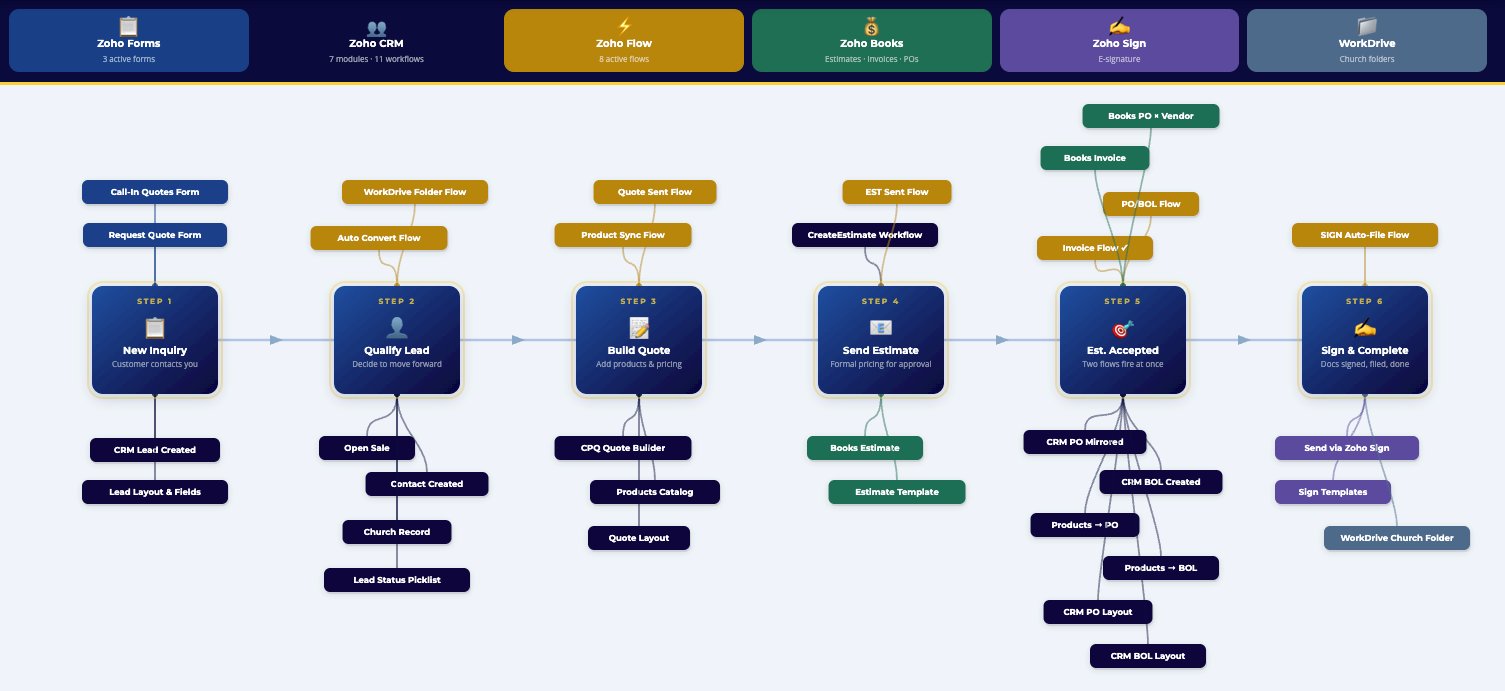
A full operational map — every stage, every automation, every connection.
This isn’t a diagram we handed over and walked away from. It’s a living reference the client uses to navigate their own system. Every step links directly into Zoho so staff can find what they need and fix what’s broken without calling anyone.
No more wondering. No more chasing. No more lost work.
"I used to spend half my Friday afternoons doing paperwork. I don't do that anymore."
The tools don't matter.
The system does.
Zoho was the right fit for this client. For your business it might be Jira, Teamwork, Basecamp, HubSpot, Monday — or something we build from scratch so you're not paying subscriptions forever.
What matters is understanding how your operation actually works and building the infrastructure to support it. That's the work. The platform is just the tool we use to do it.
Want the full breakdown? Estimate to Invoice on Autopilot →
Pen and paper to a full digital operation.
If this looks anything like your business, I want to hear about it. Tell me what’s manual, what keeps falling through the cracks, and where your team is filling gaps with memory and spreadsheets.